OpenSSH 弱密码算法问题处理
OpenSSH 弱密码算法问题处理
1、查询
密码算法是通过 OpenSSH 服务配置中进行设置,根据 sshd_config 中的描述,系统默认使用了下面密码算法:
chacha20-poly1305@openssh.com,aes128-ctr,aes192-ctr,aes256-ctr,aes128-gcm@openssh.com,aes256-gcm@openssh.com,aes128-cbc,aes192-cbc,aes256-cbc,blowfish-cbc,cast128-cbc,3des-cbc
我们可以通过 sshd -T | grep ciphers 查询当前设备支持的算法情况,默认没有特别配置的情况下,查询出来结果如下:

2、修改
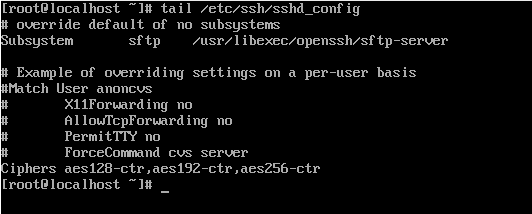
我们可以通过在 /etc/ssh/sshd_config 配置文件中设置 Ciphers 参数来达到调整支持密码算法的目的,打开 /etc/ssh/sshd_config 配置文件,在文件末尾添加下面内容:
Ciphers aes128-ctr,aes192-ctr,aes256-ctr
修改完效果如下:
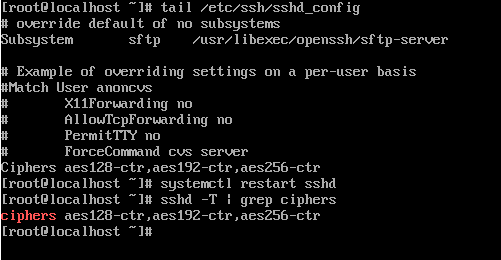
3、重启
这时候使用 systemctl restart sshd 重启 OpenSSH 服务,再次用命令查询支持情况: