麒麟服务器系统【白名单限制ssh登录】
-
配置 pam 模块添加 access 访问控制
vim /etc/pam.d/sshd添加 account required pam_access.so
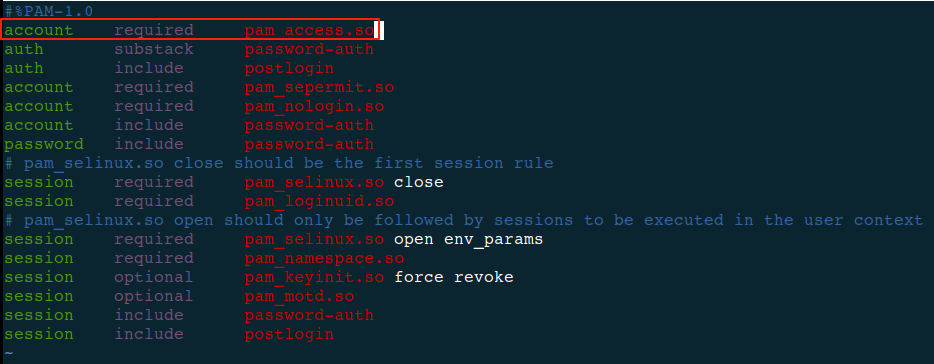
保存退出
-
修改配置文件
vim /etc/security/access.conf`配置规则
-/+:用户:IP/网段 说明,以上以冒号为分隔: 第一段:加号+代表允许,减号-代表不允许; 第二段:用户,可以是自定义用户,root用户,以及所用用户ALL; 第三段:可以是单个ip,也可以是一个IP段,或者是所有IP,ALL;- 拒绝 192.168.1.2 这个 ip 使用 root 用户访问本机

- 拒绝 192.168.1.0/24 这个网段的所有 ip 使用 root 用户访问本机
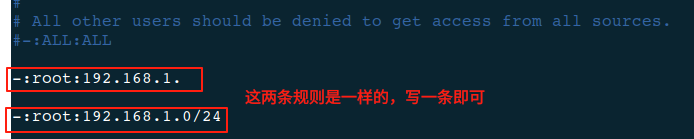
- 仅允许 192.168.1.3 这个 ip 使用 root 用户访问本机

- 仅允许 192.168.1.3 和 192.168.2.3 这两个 ip 使用 root 用户访问本机
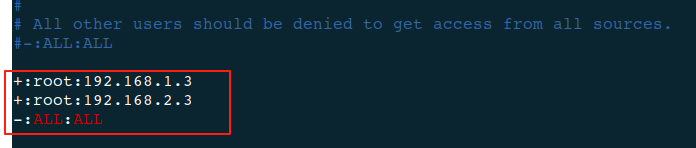
- 拒绝 192.168.1.2 这个 ip 使用 root 用户访问本机
-
重启sshd服务生效
sudo systemctl restart sshd